Framer vs Next.js: A 2026 Guide for Portfolios, SaaS, Ecommerce, and Landing Pages
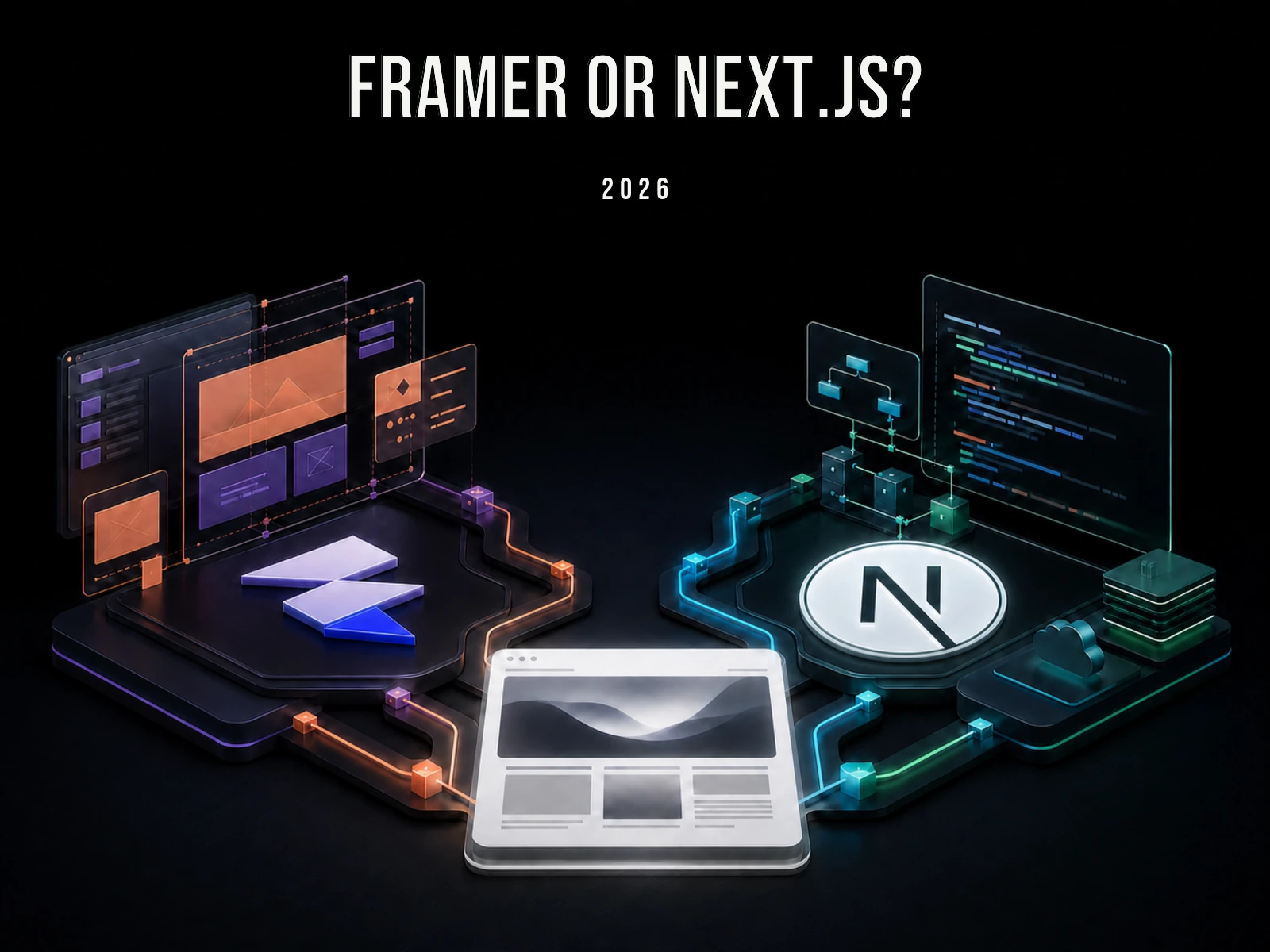
A portfolio and an application with user accounts do not begin with the same job. The portfolio needs a deliberate public presentation that can be edited and published. The application needs programmed behaviour, private data, and rules that continue to run after the page loads.
Framer is a visual website builder that combines a design canvas, CMS, and hosting. Next.js is an open-source React framework for programming an interface together with server-side code and data access. One is an integrated place to make and publish a site; the other is a foundation for building a web product in code.
The choice is not a contest between “no-code” and serious engineering. A public-facing site may be finished sooner in Framer. Accounts, private data, or custom server logic pull the work toward Next.js. A conventional store may need a complete commerce platform before either product belongs in the decision.
Let the job choose the tool
- Choose Framer when the finished thing is primarily a public website and the visual canvas is the quickest way for you to make it.
- Choose Next.js when the site needs accounts, stored data, server logic, custom APIs, or deep integration with a product.
- Use both when a visually independent marketing site sits in front of a coded application.
- Choose something else when the category already has a better complete product. A conventional store often needs Shopify before it needs Framer or Next.js.
That last option matters. A comparison headline should not force every project into one of its two nouns.
One is a place to make a website; the other is a way to program one
Framer runs in the browser and feels familiar to people who work in Figma. You create responsive layouts on a canvas, turn repeated elements into components, animate them, connect CMS collections, and publish. The same product supplies hosting, SSL, CDN delivery, forms, SEO controls, analytics, and a content editor. The canvas is not merely a mockup: it becomes the live site.
Framer can be extended with plugins, Custom Code, and React Code Components. Those are useful for widgets and isolated behavior. They do not turn the project into a general-purpose backend where you design your own database, authentication model, subscription system, and server processes.
Next.js begins on the other side of the glass. It is an open-source framework built on React. You write components and use its routing, server and client rendering, data access, caching, image and font handling, API routes, and build system. It assumes that you know—or are prepared to learn—HTML, CSS, JavaScript, and React.
There is no mandatory Next.js CMS or host. A five-page site can read content from files. A publication can connect to Sanity. A SaaS can use PostgreSQL, Supabase, Stripe, and Auth.js. Deployment can go to Vercel, another platform, or a server you operate through Coolify.
| Layer | Framer includes it? | Next.js includes it? |
|---|---|---|
| Visual page editor | Yes, it is the main interface | No; build one or add a CMS/editor |
| CMS | Built in | Choose files, a service, or your own database |
| Hosting | Built in | Choose a provider or self-host |
| Application backend | Use external services and integrations | Server logic, APIs, auth, and databases can live with the app |
| Source repository | The project remains on Framer | You own the code and Git history |
Follow four real builds
1. A creative portfolio
A photographer or visual designer normally needs project pages, an about page, contact details, and perhaps a journal. The value is in selection, sequencing, typography, image treatment, and motion. Framer is a strong default because it lets the author spend time on those things instead of rebuilding a publishing stack.
A frontend engineer may want the opposite. If the portfolio contains a WebGL experiment, interactive data, a live code playground, or an unusual navigation model, the implementation is part of the evidence. Next.js lets the website double as a code sample.
Occupation is not a rule. A developer with job applications due on Monday may make a better decision by publishing in Framer over the weekend. A designer who enjoys React may prefer total control in code. Ask whether constructing the site is itself work you want visitors to judge.
2. A one-person SaaS
The word “site” hides two surfaces. The product has sign-up, login, billing, user data, email, uploads, and business rules. The public website has positioning, screenshots, pricing, documentation, articles, and a waitlist or demo form.
The application belongs in Next.js or another application framework. Framer is not a substitute for its backend architecture. The public surface can go either way. Keeping it in the Next.js repository makes sense when it shares components, account state, price data, analytics, or release timing with the app. Separating www in Framer from app in Next.js makes sense when visual iteration is unrelated to product code.
This is not only an organizational decision for funded companies. A solo founder also has limited hours. If React is your fastest medium and a starter already exists, another Next.js route may cost almost nothing. If the landing page turns into three days of spacing and breakpoint work, Framer may return those days to the product.
3. A content-led business
Framer CMS can model posts, case studies, resources, directories, and other repeatable pages. You design the template visually and publish entries with their own copy, media, URLs, and metadata. For a contained publication, that avoids adding a separate content platform.
Next.js can also keep a small publication simple. A technical author may prefer Markdown or MDX in Git. The reason to add a headless CMS is not that Next.js demands one; it is that the publishing workflow does. Custom relationships between authors, products, documentation versions, taxonomies, application records, and automated pages are where a programmable content model begins to earn its cost.
Do not decide from a magic post count. Decide from how content is authored, how it relates to other data, whether a visual editor is required, and what would have to move during a future migration.
4. An online store
Neither product is a complete commerce operation by itself. Framer can become a custom Shopify storefront through marketplace plugins that sync products and variants into the CMS and add cart and checkout components. Shopify remains responsible for product data, inventory, orders, and payment.
A headless Next.js store makes the same separation with more code and more freedom. Vercel’s maintained Next.js Commerce starter uses Shopify: Next.js renders the storefront while Shopify provides commerce APIs. Other backends can play that role too.
If a normal Shopify theme can sell the products well, use it. A custom frontend is justified when brand presentation, search, navigation, localization, personalization, or product interaction cannot be delivered by the standard storefront. Framer plus Shopify offers visual control with less frontend engineering. Next.js plus a commerce backend gives the highest ceiling and the largest maintenance surface.
A landing page is not automatically a Framer project
Framer is often the shortest route to an event page, waitlist, product validation site, or paid campaign. A template, responsive canvas, form, custom domain, and publish button cover the whole job.
But a landing page inside an existing application is different. If a Next.js product already has typography, buttons, analytics, consent, deployment, and tests, creating a route may be easier than introducing a second platform. The visual complexity and expected lifetime matter more than the fact that it is “only one page.”
I would use Framer for a disposable campaign that needs art direction and frequent visual changes. I would use Next.js for a page that reads live product data, changes for signed-in users, participates in feature flags, or forms the first step of an application flow.
Price the path, not the license
The following figures were checked on July 27, 2026 against official pricing pages with annual billing selected. Tax, domain renewals, premium templates and plugins, external services, and implementation time are excluded.
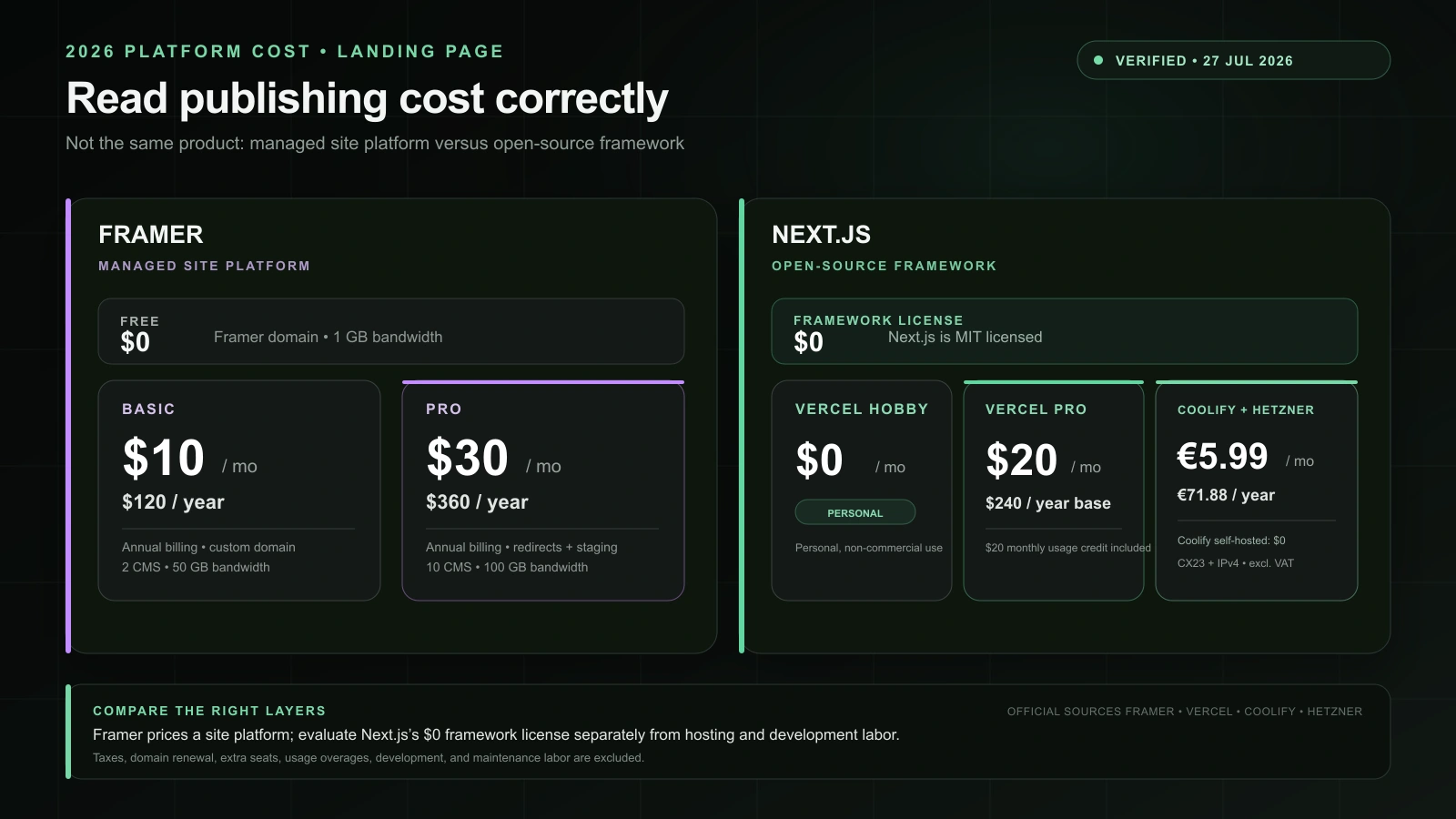
Framer Free is $0 on a Framer domain. Basic is shown at $10 per month with annual billing, or $120 per year, for a small site requiring a custom domain. Pro is $30 per month, or $360 per year. CMS, bandwidth, localization, and editing requirements determine which plan actually fits.
The Next.js framework is MIT licensed. Vercel Hobby is $0 per month for personal, non-commercial use, which can suit a personal portfolio. Vercel Pro has a $20 monthly base, or $240 per year, with $20 of included monthly usage credit.
Vercel is one host, not part of the framework. Self-hosted Coolify is free. Coolify Cloud starts at $5 per month for two connected servers, and you still pay for those servers. Hetzner’s post–June 15, 2026 Germany/Finland price lists a CX23 at €5.49 per month and public IPv4 at €0.50, making this example €5.99 per month or €71.88 per year, excluding VAT.
real year-one cost =
platform + hosting + domain
+ templates, plugins, and external services
+ time spent building the first version
+ changes made during the year
+ maintenance or eventual migration
A cheap VPS transfers patching, backups, monitoring, and recovery to its owner. Framer removes most infrastructure work but introduces a recurring subscription and platform dependency. A free framework can therefore cost more time than a paid builder, while a paid builder can cost more money than a site that is easy for its owner to code.
SEO and performance are implementation results
SEO
Framer provides page and CMS metadata, URL controls, alt text, redirects, indexing settings, sitemap.xml, and robots.txt. JSON-LD can be added through Custom Code, and Localization supports language output and hreflang.
Next.js supplies programmable metadata, generateMetadata, Open Graph image generation, and conventions for code-generated sitemaps and robots rules. It is a natural fit when thousands of pages derive their metadata and schema from records. It also permits thousands of ways to publish a wrong canonical.
A portfolio and conventional business site do not need exotic SEO architecture; Framer’s controls cover the technical foundation. Programmatic pages, unusual canonical logic, or metadata tied to application state benefit from Next.js. Search engines evaluate the output, not the tool badge.
Performance
Framer pre-renders published sites and provides global edge delivery, caching, compression, responsive images, AVIF, lazy loading, and font optimization. Next.js includes next/image, next/font, Server Components, caching, and static export.
Both can still ship an expensive page. Autoplay video, giant assets, several embeds, chat, analytics, and animation can erase Framer’s good defaults. Excess client components, large dependencies, and the same third-party scripts can do the same in Next.js.
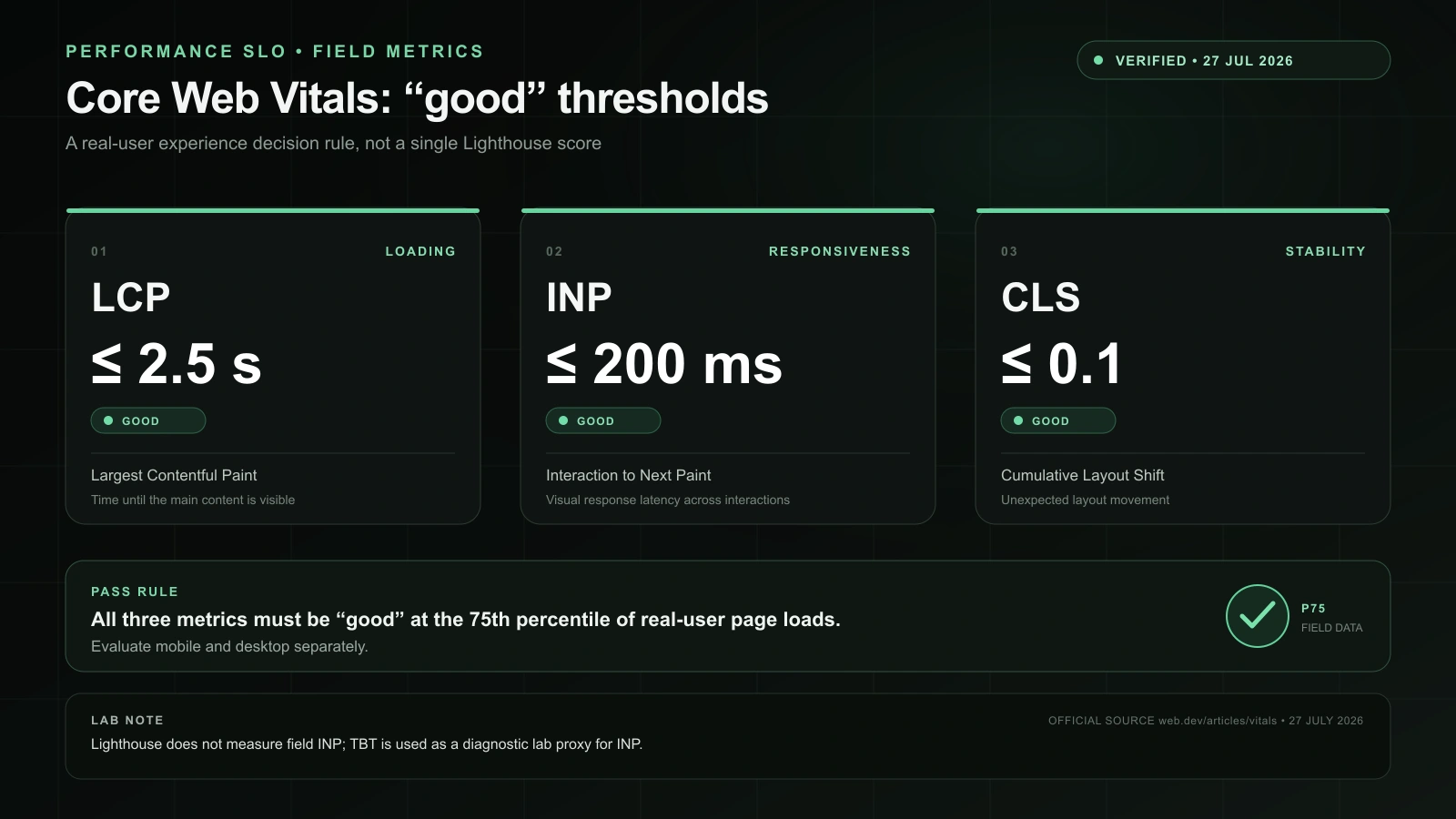
Lighthouse is useful for catching regressions, not declaring a platform winner from two unrelated public sites. A fair test needs the same design, image dimensions, fonts, video, forms, consent tooling, and analytics. Field data from Search Console, CrUX, or real-user monitoring is the result after launch.
Seven decisions I would make today
- A motion-heavy creative portfolio: Framer.
- A developer portfolio where the implementation is part of the pitch: Next.js.
- A one-page validation site needed this week: Framer, unless a working Next.js starter already exists.
- A solo SaaS product: Next.js for the app; choose the public site separately.
- A conventional shop: Shopify first; add Framer or Next.js only for a justified custom storefront.
- A publication: Framer for a contained visual workflow, or Next.js plus files/CMS for custom models and automation.
- Anything with accounts, dashboards, stored data, or product-specific server rules: Next.js.
This portfolio uses Next.js because its bilingual blog, admin tools, API routes, SEO output, and experiments share one repository. That is evidence about this project, not every portfolio. If the requirement were only project images, case studies, and an about page, Framer could be the more intelligent build.
If Next.js is the answer, the surrounding toolchain still deserves scrutiny. I compared the current build boundaries in Webpack vs Vite vs Turbopack and documented a measured compiler migration in my TypeScript 7 test.
Primary sources used
- Framer website builder overview
- Framer CMS website builder
- Framer pricing
- Framer SEO features and tools
- Framer structured data through JSON-LD
- Framer hosting infrastructure
- Framer image optimization
- Framer site optimization
- Framer developer FAQ
- Framer Marketplace Shopify commerce plugin
- Next.js framework definition and documentation
- Next.js MIT license
- Next.js metadata and Open Graph images
- Next.js image optimization
- Next.js font optimization
- Next.js static exports
- Next.js self-hosting
- Vercel Next.js Commerce with Shopify
- Vercel pricing
- Coolify self-hosted and Cloud pricing
- Coolify self-hosted and Cloud responsibilities
- Hetzner June 15, 2026 price adjustment
- Hetzner Cloud server and Primary IPv4 pricing
- Google web.dev Core Web Vitals
About the Author

Enes Kaymaz
Enes Kaymaz
Designs, writes code, and occasionally turns the two into a product.
Read More About Me →Related Posts
View All →
Where Should a Next.js App Run? Vercel vs Coolify on a VPS
A source-checked comparison of Vercel and Coolify on a VPS: what each one manages, what it costs, and which risks remain yours.
Read More →
Is TypeScript 7 Really 10x Faster? A Real Next.js 16 Migration
A real Next.js 16 project cut median standalone type-checking from 4.79s to 0.45s, but the direct TypeScript 7 upgrade broke compiler-API consumers. Here are the benchmark, working setup, and migration limits.
Read More →Subscribe to my newsletter
Get the latest updates on design, development, and tech trends.