SEO Is Not Enough: Is Your Website Ready for AI Agents?
A browser agent is AI software that can inspect a web page and act on a user’s behalf: select a filter, fill a form, or prepare a transaction. People infer controls from visual context. Agents usually have to reconstruct that meaning from the DOM, accessibility tree, text, and current screen state.
WebMCP is a proposed browser API that lets a web application describe selected actions as structured tools instead of leaving every click to interpretation. A site could expose “search published articles,” for example, together with the input it accepts and the result it returns.
This does not replace SEO or a usable interface. SEO helps the page get found; semantic HTML and accessibility help both people and software understand it. WebMCP adds a possible third layer for describing what can be done on the page. The important question is how much of that layer is usable today, and how much remains experimental.
WebMCP is not a finished web standard. It is a proposal being developed through the Web Machine Learning Community Group and tested in Chrome through an origin trial and a local development flag. The sensible move today is not to tie an entire product to it. Treat it as a progressive enhancement and begin with a small, measurable pilot that leaves the existing interface intact.
The order of work
Prepare a website for AI agents in this order:
- Fix semantic HTML and the accessibility tree first. An input without a label or a button without a programmatic name causes problems for both people and agents.
- Make the interface stable. An element should not move after an agent identifies it because an image, ad, or late content block appears.
- Turn only valuable workflows into tools. Choose focused tasks such as searching the blog, preparing a booking, or creating a support request instead of wrapping every button.
- Expose the right tool for the current state. Do not register an unavailable action or fill the model context with overlapping tools that perform the same job.
- Keep security and user control in your application boundary. Authentication, authorization, validation, and confirmation for sensitive actions cannot be delegated to a browser API.
WebMCP sits on top of that foundation. It cannot rescue poor HTML, an ambiguous product flow, or weak backend authorization.
What does an agent-ready website mean?
A person, a search crawler, and a browser agent arrive at the same page with different needs:
| User | Primary need | Typical failure |
|---|---|---|
| Person | See the content, understand controls, and receive feedback | Ambiguous copy, low contrast, or lost form state |
| Search engine | Discover, interpret, and return the correct URL | Weak heading structure, duplicate URLs, or missing structured data |
| Browser agent | Understand state, select an action, and verify its result | Unlabeled input, moving element, ambiguous side effect, or overlapping tools |
Agent-ready does not mean removing the human interface. It means making the semantics and application logic that should already support a good human experience explicit enough for an agent too. The user still sees the action happen, shares the page state, and can take back control.
How the page-level tool model differs from backend MCP
Chrome's WebMCP documentation describes it as a proposed standard for exposing structured web application tools to AI agents. A page can explicitly provide three things:
- Discovery: Which tools are available on the page right now.
- Schema: The parameters and data types each tool expects.
- State: Which actions make sense in the current page context.
A conventional MCP server usually runs as a separate process or backend service. A WebMCP tool runs in the page's JavaScript and within an open browser context. The community group draft says a WebMCP page can be thought of as an MCP server whose tools are implemented in client-side script. That analogy does not mean the two share an identical transport or trust model.
There is another important boundary: WebMCP needs the page to be open in a browser tab or webview. It is not a headless automation layer that replaces your backend. It is designed for a person and an agent to work through the same application interface and state.
Why is clicking through the DOM not enough?
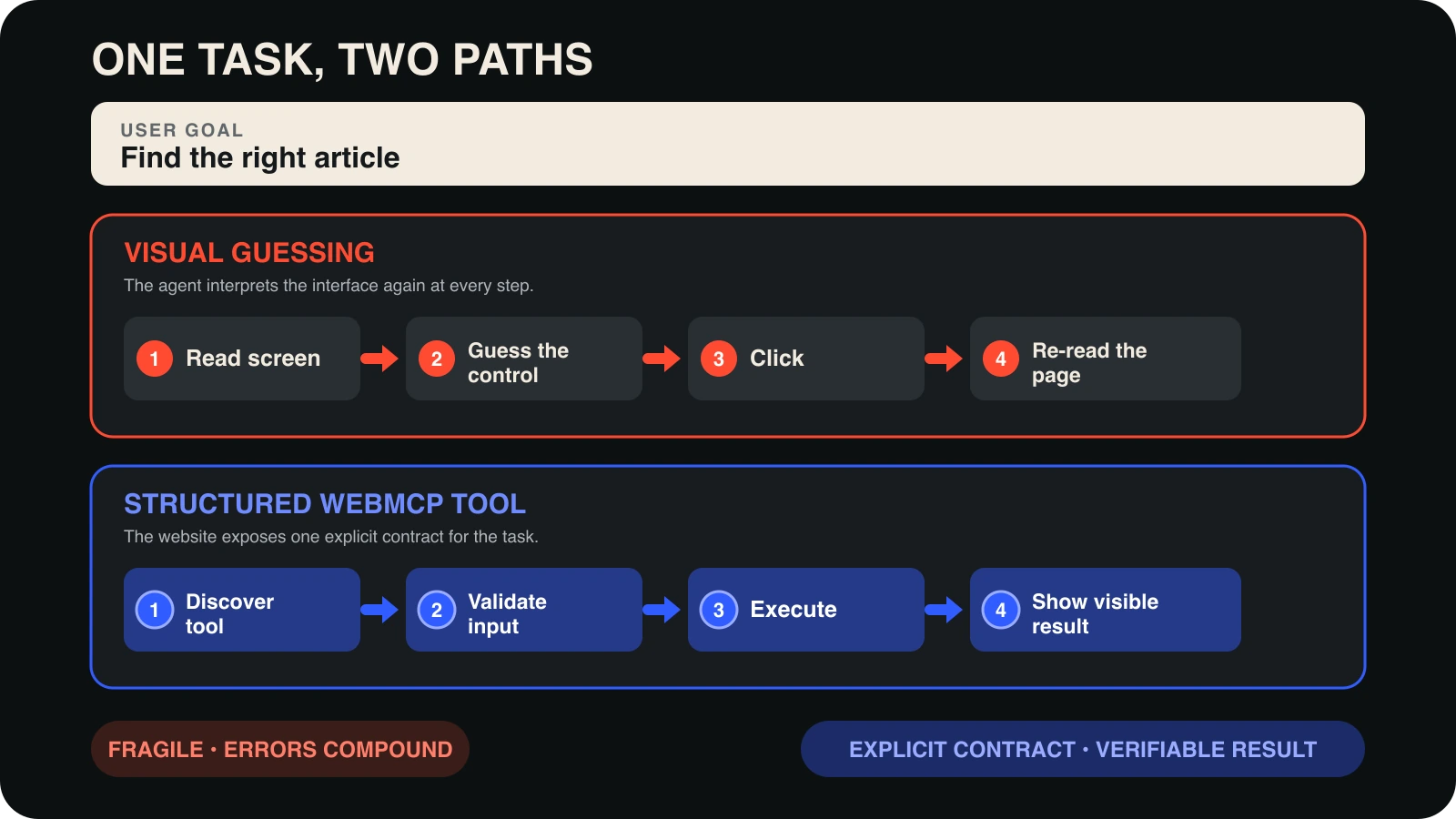
Visual actuation asks an agent to infer the meaning of buttons and fields at every step. That can work on a simple semantic page. The error surface grows when it meets a complex form, a custom date picker, late-loading results, or several actions with similar names.
Consider a support form with a button labeled “Send.” Does it:
- create the ticket immediately,
- open a review step,
- upload the attachment and stay on the form,
- or request final confirmation from the user?
A person may infer the answer from nearby copy and visual hierarchy. An agent uses the accessibility tree, DOM, screenshot, and prior steps to decide. WebMCP tries to replace “what does this control probably do?” with a contract that says “this tool performs this task with these inputs.”
When should you use the declarative or imperative API?
WebMCP proposes two implementation paths. The Declarative API annotates a standard HTML form as a tool. It is the lowest-cost starting point when the form already has sound semantics:
<form
  toolname="prepare-contact-request"
  tooldescription="Fills a contact request and shows it before submission."
>
  <label for="name">Your name</label>
  <input id="name" name="name" autocomplete="name" required />

  <label for="message">Your message</label>
  <textarea id="message" name="message" required></textarea>

  <button type="submit">Review request</button>
</form>
A browser without WebMCP support continues to treat this as a normal HTML form. That is the core progressive-enhancement advantage.
The Imperative API registers tools with JavaScript for search, filtering, page-state-dependent actions, or custom application logic. This simplified example searches published blog posts:
if ('modelContext' in document) {
  await document.modelContext.registerTool({
    name: 'search-published-posts',
    description: 'Searches published blog posts by topic.',
    inputSchema: {
      type: 'object',
      properties: {
        query: { type: 'string', maxLength: 120 }
      },
      required: ['query'],
      additionalProperties: false
    },
    execute: async ({ query }) => {
      const posts = await searchPublishedPosts(query);
      renderSearchResults(posts);
      return { posts };
    }
  });
}
This is a small illustration of the API shape, not a production recipe. A real implementation must validate again in JavaScript and on the backend, limit output, return actionable errors, and make sure the visible interface reflects the completed operation.
What makes a good WebMCP tool?
The official best practices favor clear tools over a large tool catalog. A reliable contract has these qualities:
- It performs one function. Prefer
search-postsorprepare-contact-requesttomanage-site. - Its name states the real action. Starting a process and completing a transaction should not hide behind the same verb.
- It does not overlap. Do not expose three search tools whose selection criteria are unclear.
- It is registered at the right time. Show it only when it can run in the current page state and unregister it afterward.
- It accepts raw user input. Do not make the model perform unnecessary calculations or obscure format conversions.
- It validates strictly in code. JSON Schema helps the model; it is not application security.
- It updates the interface. The person and agent should see the same completed state.
- It returns a recoverable error. Explain which input failed and why instead of returning only “failed.”
Unlimited tools are not free. Every definition uses model context, and similar tools make selection harder. The smallest useful tool set is usually the most reliable one.
What does Lighthouse Agentic Browsing measure?
Chrome's Agentic Browsing audits use deterministic checks to evaluate machine interaction readiness. The category is experimental and does not produce the familiar weighted 0–100 Lighthouse score. It reports a pass ratio, individual pass or fail states, and warnings.
| Area | Signal | Why it matters |
|---|---|---|
| Accessibility | Programmatic names, labels, roles, and tree integrity | Agents use the accessibility tree as a primary model of the page. |
| Visual stability | Cumulative Layout Shift | An element moving between selection and action can cause a wrong click. |
| WebMCP | Declarative and imperative registration and schema validity | It verifies that application capabilities are structured and discoverable. |
| Discoverability | Presence of llms.txt at the domain root |
It provides an informational check for a machine-readable site summary. |
A deterministic audit cannot prove that a real agent will complete every task. Lighthouse checks foundational technical signals. You still need evaluation scenarios based on the real jobs your product expects an agent to perform.
What would a small EnesKaymaz.com pilot look like?
A portfolio and content site does not need dozens of tools. Three candidate flows are enough:
- Blog search: A read-only
search-published-poststool finds articles by topic, category, or keyword and renders the results in the normal interface. - Contact request preparation: A declarative form maps a name and message to the right fields while the user reviews the request before sending it.
- Newsletter form: An agent can prepare the email field, but final subscription intent and verification remain with the user.
Publishing an article, deleting content, or starting a deployment from the admin panel should not be part of this first pilot. Those are higher-impact capabilities that require a different authentication boundary and explicit transaction confirmation.
WebMCP security: structured does not mean safe
WebMCP can replace ambiguous DOM interaction with a clearer contract. The tool description, parameters, and returned content still enter a model's decision context. Prompt injection, tool poisoning, intent mismatch, and excessive data sharing do not disappear.
Chrome's WebMCP security guidance recommends untrustedContentHint for tools that return external or user-generated content and readOnlyHint for tools that do not change state. These are signals to the agent, not security policies that replace backend authorization or human confirmation.
Origin isolation and the tools Permissions Policy also matter. Tools stay within the same-origin boundary by default. If you expose them cross-origin, explicitly select only origins you genuinely trust. Even a read-only tool can leak private favorites, drafts, or user-specific results.
The broader principles in the MCP security guide still apply here: least privilege, meaningful confirmation, strict input validation, untrusted output, auditability, and policy enforcement outside the model.
A 12-point agent-ready website checklist
- Give every interactive element a programmatic name and associated label.
- Use the right input type,
name, autocomplete value, and actionable form error. - Set image dimensions and prevent late content from causing layout shifts.
- Test important flows with a keyboard and the accessibility tree.
- Select one measurable user task before implementing WebMCP.
- Design each tool around one function with a distinct, accurate name.
- Register tools only when they are valid in the current page state.
- Validate input in code and on the backend in addition to the schema.
- Update the visible interface and show the result when an action completes.
- Request concrete confirmation for state changes, payments, and data submission.
- Mark external content as untrusted and limit descriptions and outputs.
- Combine Lighthouse with real task evals, accessibility testing, and security review.
Should you implement it now?
A small WebMCP pilot makes sense if your product includes booking, complex forms, product filtering, support, or in-browser productivity workflows. Accept that the API may change, use feature detection, and keep the normal human flow working at all times.
If you publish a simple content site, WebMCP does not need to be your first investment. Semantic HTML, accessibility, performance, layout stability, useful search, and clear information architecture can deliver more value to people, crawlers, and agents alike.
The central idea behind WebMCP is still valuable: a website is becoming more than a collection of pages to read. It can be an interface where a person and an agent work together under the person's control. The foundation has not changed, however. Clear tasks, understandable UI, least privilege, and verifiable outcomes make a sound product for both humans and agents.
Primary sources
- Chrome for Developers: WebMCP
- Chrome for Developers: WebMCP origin trial
- Chrome for Developers: WebMCP best practices
- Chrome for Developers: WebMCP tool security
- Chrome for Developers: Agent-ready website toolkit
- Chrome for Developers: Lighthouse Agentic Browsing audits
- Web Machine Learning Community Group: WebMCP draft
- WebMCP explainer and development repository
WebMCP and Agentic Browsing are experimental technologies. When this article is updated, recheck the API shape, browser support, and security guidance against the primary sources.
About the Author

Enes Kaymaz
Enes Kaymaz
Designs, writes code, and occasionally turns the two into a product.
Read More About Me →Related Posts
View All →
TanStack Query Prefetching: Start the Request Before Navigation
Prefetching does not make an API faster; it starts likely future work earlier. This practical TanStack Query v5 guide covers query keys, freshness, request waterfalls, router and SSR choices, and how to measure the tradeoff.
Read More →
Where Should a Next.js App Run? Vercel vs Coolify on a VPS
A source-checked comparison of Vercel and Coolify on a VPS: what each one manages, what it costs, and which risks remain yours.
Read More →Subscribe to my newsletter
Get the latest updates on design, development, and tech trends.